Write connected notes and handouts
Build multi-page entries with structured content, images, live references, and backlinks.
An entry can hold several pages for one subject. Pages carry the prose and images; references connect that writing to records whose names and values may change during the campaign.
#Build the entry
Create and name the pages
Open Field Notes: The Meridian Lens, choose Edit, and add a page. Give each page a title that makes sense in the page list, then drag the pages into the order you will use at the table.
Write structured content
Use headings, paragraphs, lists, and callouts instead of one uninterrupted block. Add an image page for a diagram or player handout whose visual order matters.
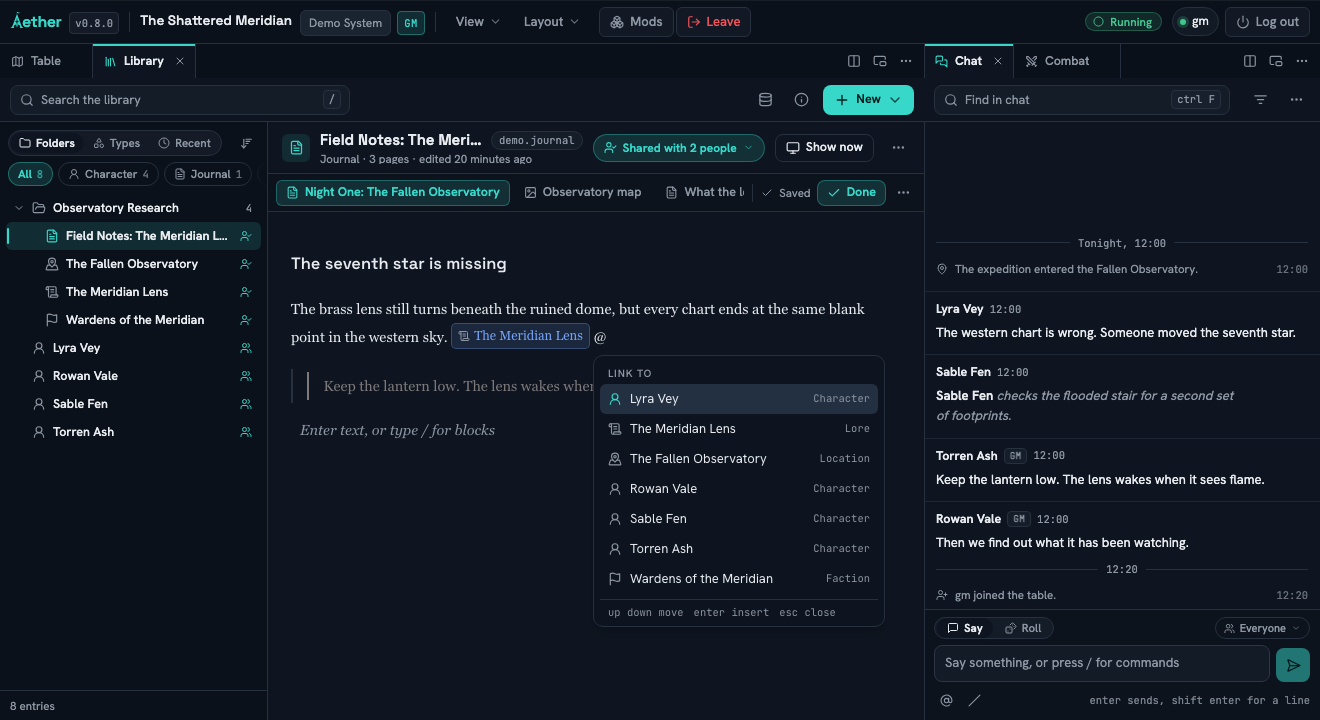
Insert an entry reference
Type @ and choose The Fallen Observatory, Wardens of the Meridian, or a member of the
approved cast. The reference follows that entry if its title changes.
Insert a live value
Type #, choose a record and exposed value, and confirm the inserted field. A live value reads
the current record instead of freezing a copied number into the paragraph.
Follow both directions
Save the entry, follow one reference to its destination, then use the destination's backlinks to return. This confirms the connection is part of the Library, not merely styled text.
Use page-level access when one page is stricter than its entry. Do not duplicate the whole entry just to hide a GM page; the sharing guide explains the available levels.
Continue with Share and present Library material.