Set scene lighting and shadow quality
Preview and apply a shared sun, ambient fill and shadow casters, then choose Automatic, Reduced or Off shadow rendering for your own device.
A scene can carry one visual environment for Map and Tabletop. The GM chooses the sun and ambient fill, then commits the complete profile to everyone at the table. Each person separately chooses how much shadow work their own device performs.
Environment lighting does not change token sight, darkness, rules lights, fog, movement or the server's hidden-document projection. Map and Tabletop keep their different cameras and controls, but use the same scene lighting.
#Preview the shared environment
Open Table, choose Map or Tabletop, then choose Edit scene and Environment. The editor opens a local draft. Other connected people keep rendering the last committed environment until you choose Apply.
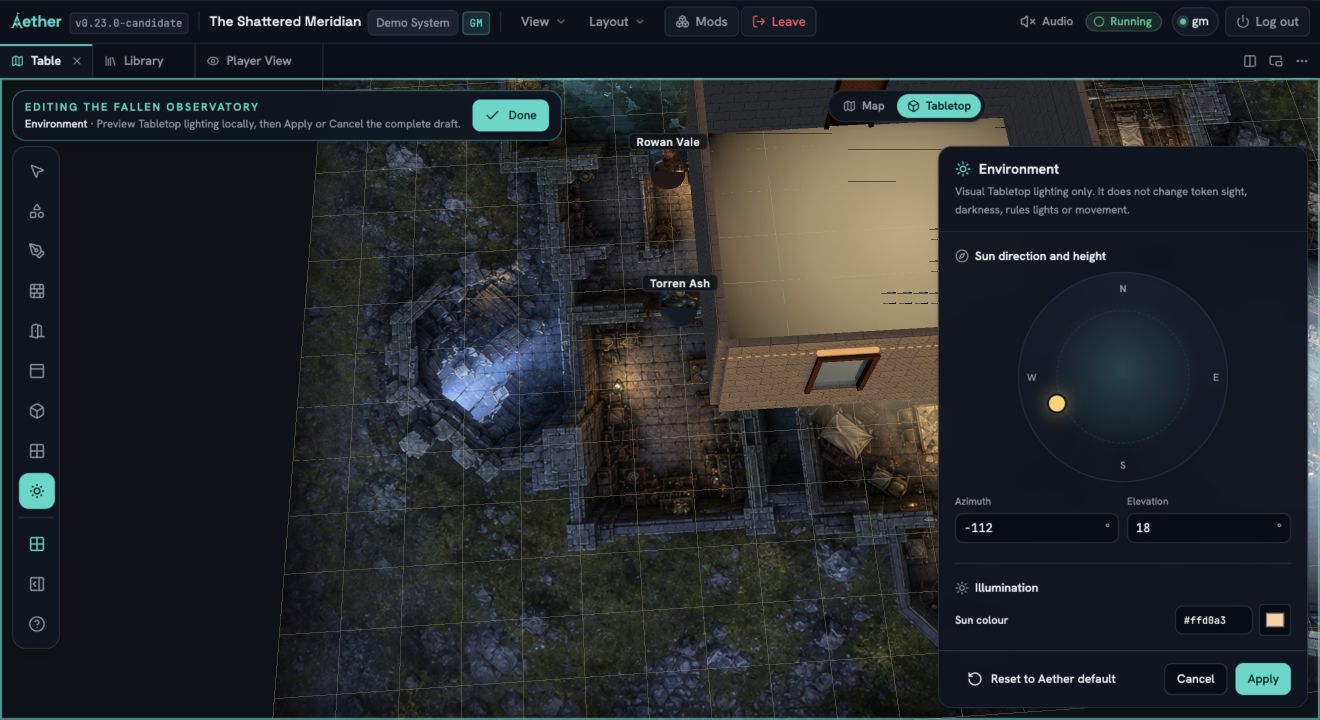
The environment fields are bounded:
- Sun direction and height: drag the sun on the compass. Distance from the centre controls elevation. Use the exact Azimuth field from -180 to 180 degrees and Elevation from 5 to 85 degrees when the direction must be reproducible.
- Sun colour and Ambient colour: enter a six-digit hexadecimal colour or use the colour picker.
- Sun strength: 0 through 8.
- Ambient strength: 0 through 4.
- Enable scene shadows: allows readers to render cast shadows. Choose whether structure, props and token bases are eligible casters.
The compass is keyboard accessible. Left and Right change azimuth; Up and Down change elevation. Each press moves five degrees. Hold Shift for one-degree steps.
Choose Apply to commit the complete profile as one History action. Cancel discards the draft and writes nothing. Reset to Aether default deliberately commits the readable white sun and ambient profile with scene shadows off, also as one History action.
If another GM changes the scene while your draft is open, the editor tells you before you apply. A rejected or unsupported write returns to the authoritative environment and shows the reason. Leaving Scene Builder, changing scenes or disconnecting discards an uncommitted draft.
#Choose shadow rendering for this device
Open View, find Display, then choose Visual settings.... This is a personal, versioned setting stored for the signed-in user on the current device. It is not part of the world or scene, does not occupy the dock layout and does not change another person's renderer.
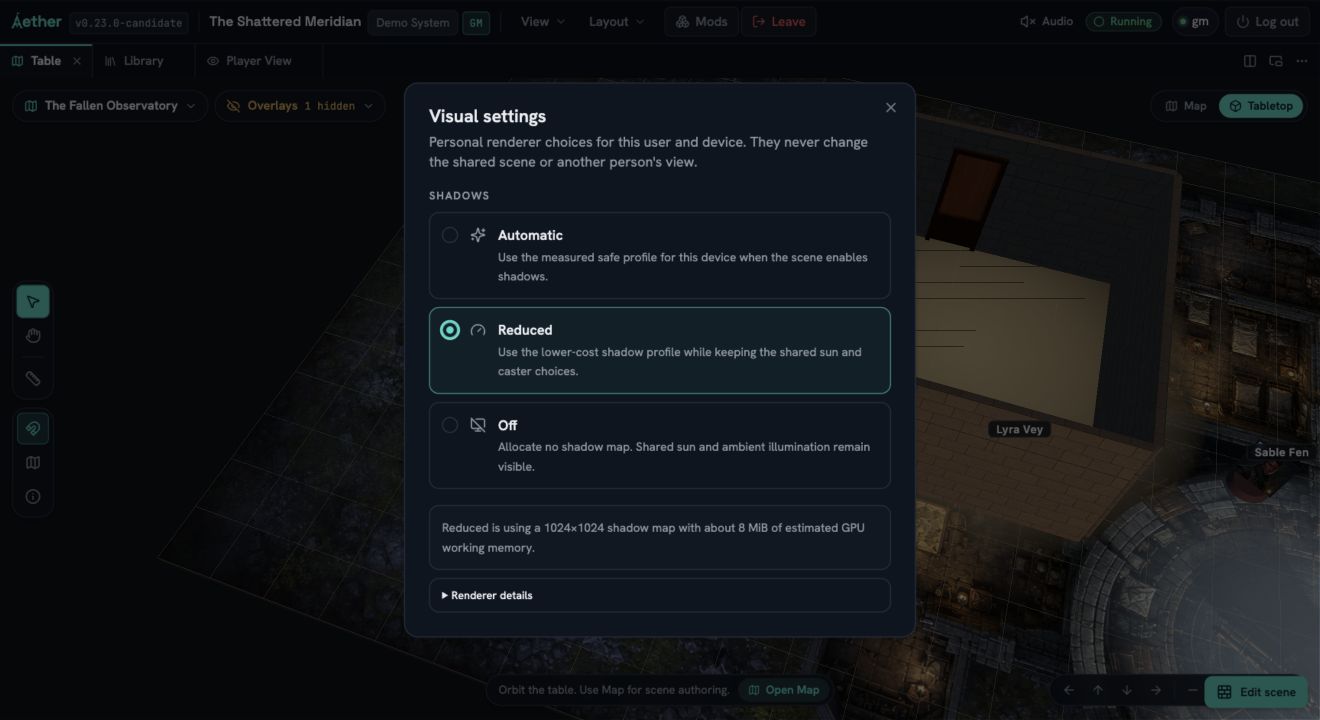
- Automatic follows the scene's shadow switch and measures the current WebGL device. It uses a shadow map no larger than 2,048 by 2,048. If a shadow update takes more than 100 ms or allocation fails, Aether reports the degradation and tries the lower-cost profile instead of silently displaying Automatic while rendering something else.
- Reduced uses a map no larger than 1,024 by 1,024. On the accepted 2,048 profile it reduces shadow pixels and the map's estimated GPU working memory to one quarter.
- Off allocates no shadow map and performs no shadow rendering. The committed sun colour, direction, strength and ambient fill remain visible.
Aether requires at least a 512 by 512 shadow map. If the device cannot allocate that minimum, the dialog reports shadows unavailable and renders Off. If the GM disabled scene shadows, the dialog says the scene has them off. A personal setting cannot turn them back on.
The View menu shows a quiet Reduced or Off hint only for a local override or measured degradation. Ordinary Automatic has no permanent badge.
#What casts and receives
The first environment release uses one sun fitted to the complete accepted scene, not the reader's camera. Orbiting, panning and zooming do not regenerate its shadow map.
Opaque structural wall and frame batches, door leaves, persistent props and token bases can cast. Transparent window faces do not. Token portrait cards stay visible but use the base as their bounded shadow silhouette so transparent art cannot produce a misleading rectangle or fragmented texture shadow. Floors, structural surfaces, supported props and the table surface receive automatically.
Large scenes keep one bounded whole-scene shadow map, so shadow edges become softer as the accepted scene bounds grow. Aether does not silently omit accepted casters to preserve detail.
Fog and computed vision are still the final authority. A hidden token, prop or structure is absent from that reader's projected caster set, so it cannot reveal itself through a shadow. Turning local shadows Off does not uncover fog or expand a visible region.