Draw barriers for vision and movement
Draw, edit, and check the invisible barrier geometry used by computed sight and movement.
Barriers are invisible rules geometry. They tell the server where sight and movement stop without adding a physical wall to the room. Their editing lines are visible only to the GM and start hidden during normal play.
Scene Builder walls already block sight and movement
Do not trace a second barrier over a physical Scene Builder wall. Use barriers for an image-only battle map, for an invisible boundary, or where the rules boundary differs from the room's visible structure.
#Enter barrier editing
Choose Barrier in the Map tool rail to reveal the barrier overlay and begin drawing. To edit existing barriers without drawing another one, choose Overlays → Barriers. A Map pill says Editing barriers while the overlay is active; choose Done on that pill when you finish.
#Draw a barrier run
Choose Barrier
Select Barrier in the Map tool rail. Click once at the start, then continue clicking to draw a chained run. Press Escape or change tools to finish it.
Follow the map
With snapping on, barrier points choose the nearest grid vertex or edge midpoint. This lets an openable barrier sit in the middle of a cell edge without turning off snapping. Hold Alt to invert snapping for one placement.
Edit the geometry
Return to Select while the barrier overlay remains visible. Drag an endpoint or segment to move it. The selection controls and context menu can split a segment, delete one segment, or delete the complete connected run.
#Add openable barriers
Right-click or hold the Barrier tool to choose Openable barrier or Hidden openable barrier. These are still rules geometry, not physical doors. The variant changes how the segment is identified and operated.
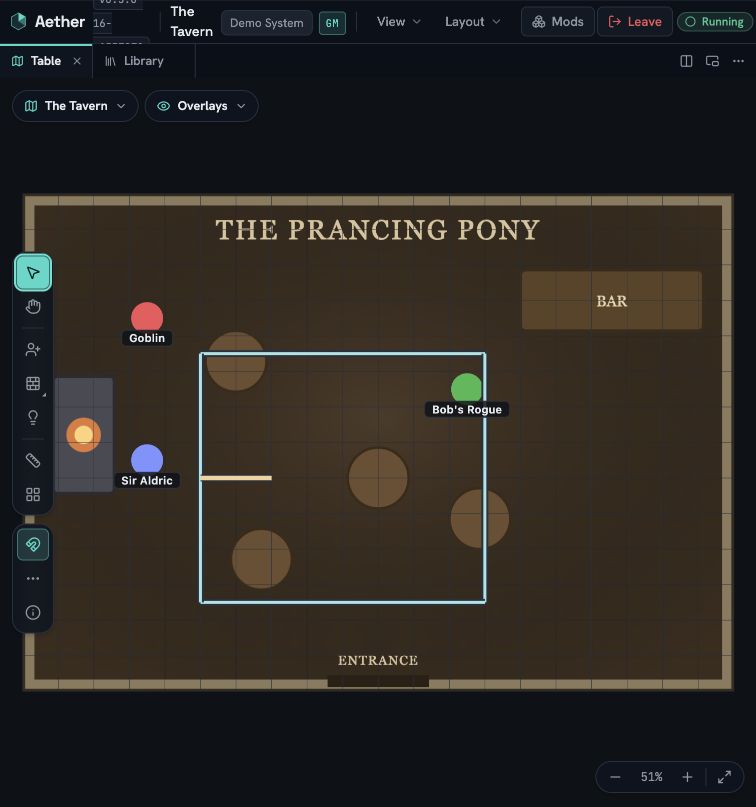
Select an openable barrier and choose Open barrier or Close barrier. An open barrier no longer blocks sight or movement; a closed barrier does. In this release only the GM operates these barriers from the canvas.
#Overlay versus rules
Choosing Done or turning off Overlays → Barriers hides the editing lines from your canvas. It does not remove the barriers and does not change what the server considers visible or passable. If you explicitly show barriers in Tabletop, they remain thin floor-plane guides instead of becoming 3D walls.
Computed vision becomes active for players when the active scene contains at least one closed, sight-blocking barrier. Until then, Aether does not fog the map just because a token has vision settings.
#Check Player View
Open View → Player View, choose a player, and move that player's token on both sides of the barrier. Check the corner joins and every openable barrier state. Player View uses the same server projection as the real player seat: a token outside current sight is not included merely because its room was explored earlier.
The overlay is not the authority
A line looking correct in the GM overlay is only the first check. Player View proves what the server actually sends to that player.